APU Software

Harmonic DJ

Find the transitions hiding in your music libraryNEW

Community free · Pro introductory price $70.00 one-time · Regular price $80.00

Download Community - Free Buy Pro (Intro price $70.00) Documentation

APU Harmonic DJ interface

Most harmonic-mixing tools stop at a key label. APU Harmonic DJ analyzes how the tracks in your own library enter and leave, then helps turn that evidence into directed transitions and complete tracklists worth hearing. That analysis distinguishes Ionian, Dorian, Phrygian, Lydian, Mixolydian, and Aeolian rather than stopping at major and minor.

Harmonic DJ handles the routine search without pretending to make the final musical decision. It can find a route through key, mode, BPM, and the rules saved with a Mix. You still decide whether the rhythm, phrasing, energy, arrangement, and transition treatment belong together.

01

Analyze locally

Build a searchable Library with key, BPM, loudness, personal track ratings, and retained harmonic evidence. Your audio stays on your computer.

02

Plan complete Mixes

Generate a tracklist with the exact requested track count, keep the positions you like, exclude the ones you do not, and search again.

03

Listen for the Gem

Use Gem Finder to explore a directed harmonic target, audition its candidates, and place the strongest next track.

04

Keep what you learn

Save, rank, browse, and reuse the directed transitions that earn your approval instead of starting from zero.

Community and Pro use the same analyzer. Pro lets you choose exact track counts above five, use Gem Finder, and save named Mixes and reusable Gems.

From Library to Mix

A useful first result does not require a theory lesson or a carefully tuned preset. Add a representative folder, let its tracks finish analyzing, and generate a preview of up to five tracks with the release defaults. That gives you something musical to react to before changing the rules.

1

Build a Library

Add files or folders, rate the tracks you love, then keep browsing and auditioning while the durable analysis queue works.

2

Generate a Mix

Choose the track count, tempo policy, groups, allowed keys, and transition profile, or begin with the defaults.

3

Refine by ear

Lock the positions that work, try an alternative, add an exclusion, and regenerate the remaining route.

4

Keep the result

Upgrade to Pro and Harmonic DJ saves the preview as a named Mix with persistent editing history and room to keep building.

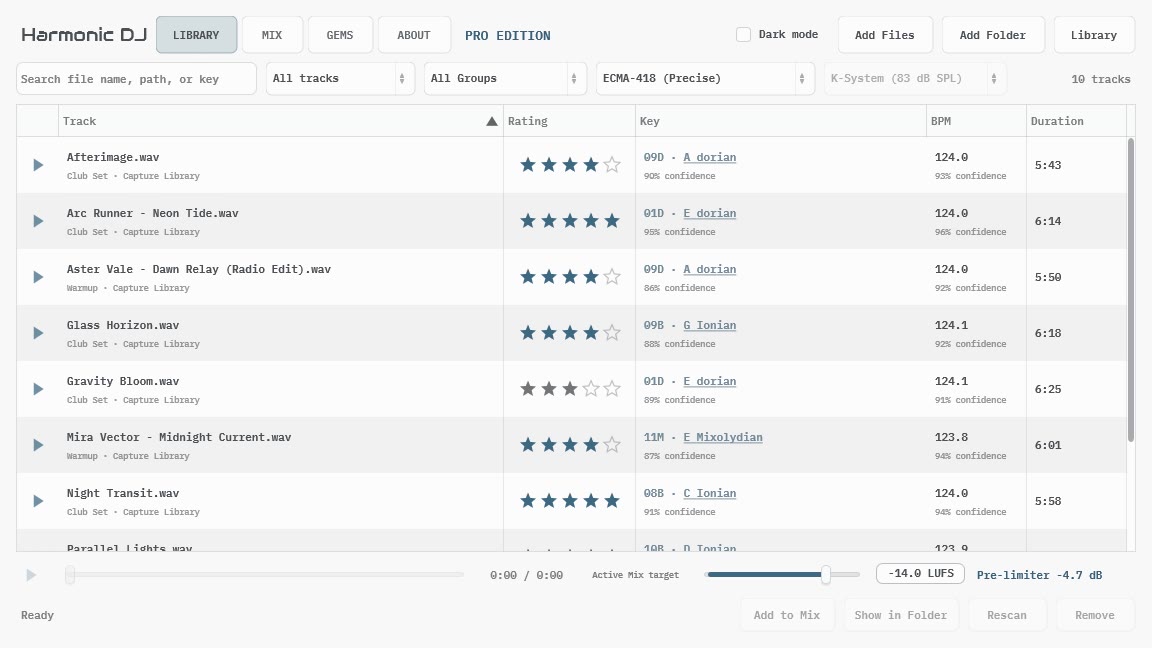
Harmonic DJ Library showing synthetic tracks with detected keys and BPM
Search, filter, group, rate, and audition analyzed tracks without waiting for the rest of the Library to finish.

Each scan collects the metadata and evidence needed by Library, Mix, Gem Finder, and saved Gems. Give any local or shared track one to five stars: favorites surface more often when the musical choices are close, while hard key, BPM, exclusion, transition-rule, and Gem constraints remain in control. Switching between the available key profiles is immediate because Harmonic DJ retains the underlying evidence instead of decoding the audio again.

Back to top

Build the Whole Route

Pair-by-pair compatibility is not enough when one poor connection can undermine a complete set. Harmonic DJ compares complete routes by improving the weakest accepted transition first, then the next weakest, with personal ratings as a bounded preference among eligible tracks. Several strong links cannot simply average away one bad one.

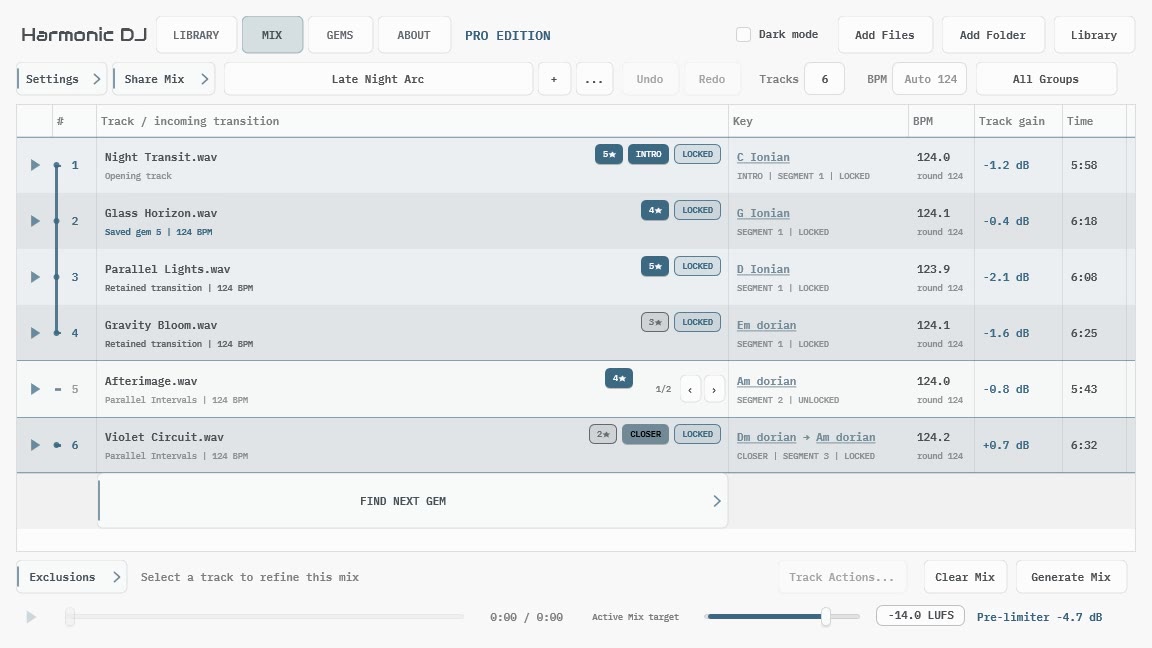
Six-track Harmonic DJ Mix with locks, roles, key changes, BPM, and gain guidance
A Mix keeps its tracklist and planning strategy together. Lock authored positions, refine the open slots, and regenerate without losing the route you already trust.

Exact track counts

Generation either fills the requested route or leaves the current tracklist unchanged. It does not quietly return a shorter answer.

Incoming and outgoing keys

The default scope compares the source track's second half with the destination track's first half instead of assuming one label tells the whole story.

Explicit BPM behavior

Keep a common rounded Mix BPM, allow deck-style speed and pitch changes, or leave every track at its native tempo.

Gain guidance

Track-relative gain recommendations and one pre-limiter Mix gain help the planned sequence approach a common listening target.

Harmonic DJ plans and auditions tracks; it does not manufacture a transition that it cannot understand. There is no invented beat grid, phrase alignment, cue point, or automatic treatment hiding behind the result.

Back to top

Find the Next Gem

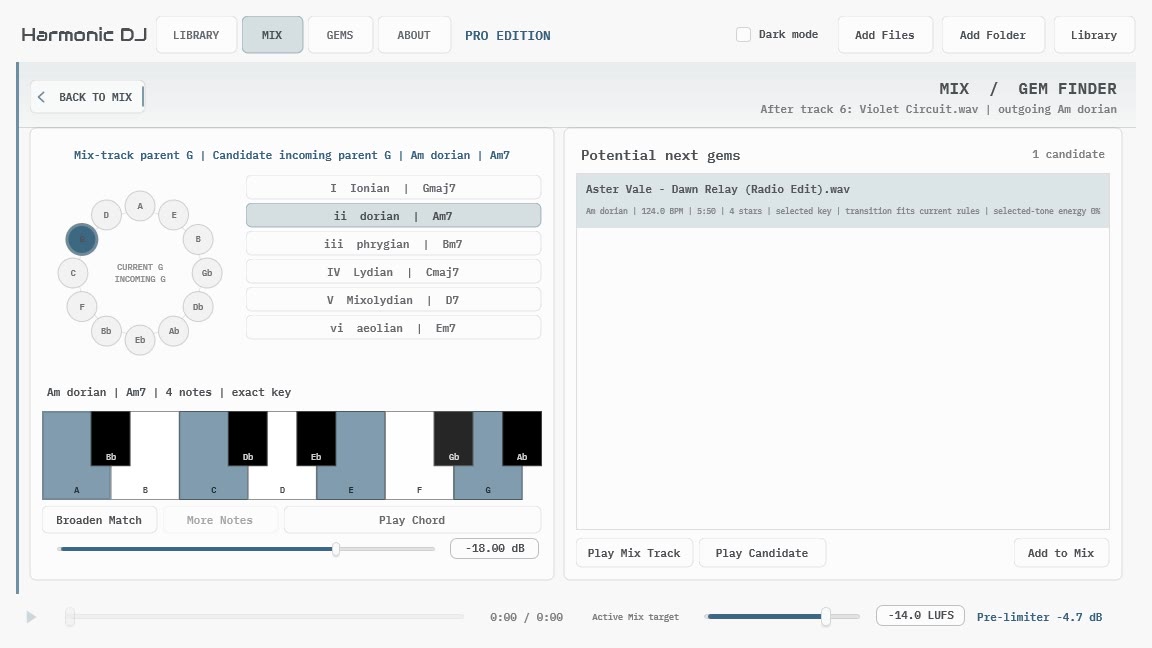
Automatic generation is useful when you want a route. Gem Finder is for the moment when you want to explore one transition deliberately.

Start from any Mix track, choose an incoming parent key and mode, and use the piano chord as a sustained harmonic probe. Broaden the match when the exact target is too narrow, audition the returned tracks, and place the candidate that survives the listening test. The tool finds possibilities; your ears decide which directed pairing is actually a Gem.

"Compatible" is a reason to listen, not a verdict.
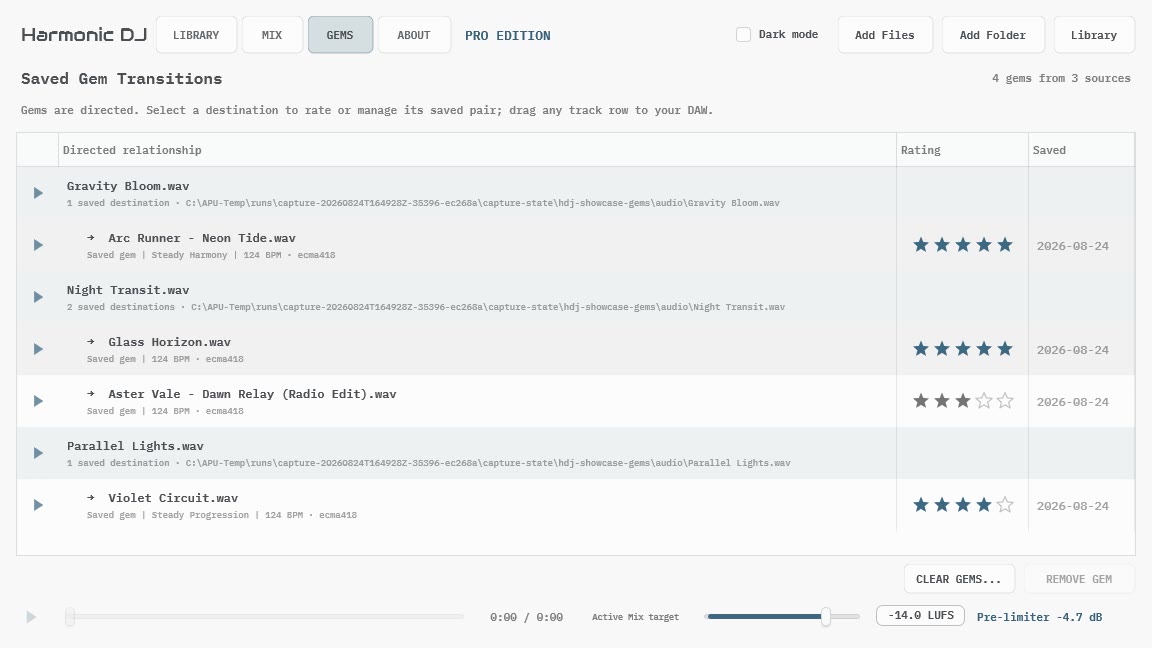
Harmonic DJ Saved Gems showing synthetic directed transitions and personal rankings
Gems are directed. Save and rank the source-to-destination relationship you heard, then reuse it later without authorizing the reverse transition.

Pro keeps the complete Gem workflow: Gem Finder, saving and rating directed pairs, browsing them by source, placing them back into a Mix, and dragging playable local tracks into an external application. Community can still preserve, view, and audition existing Pro work without rewriting it.

Back to top

More Than a Key Label

Harmonic DJ exposes enough theory to explain and shape a result, but the theory is not the result. A track can have a different incoming and outgoing key. A modal key has both a tonic and a relationship to a parent Ionian collection. A useful transition may preserve one of those layers while moving another.

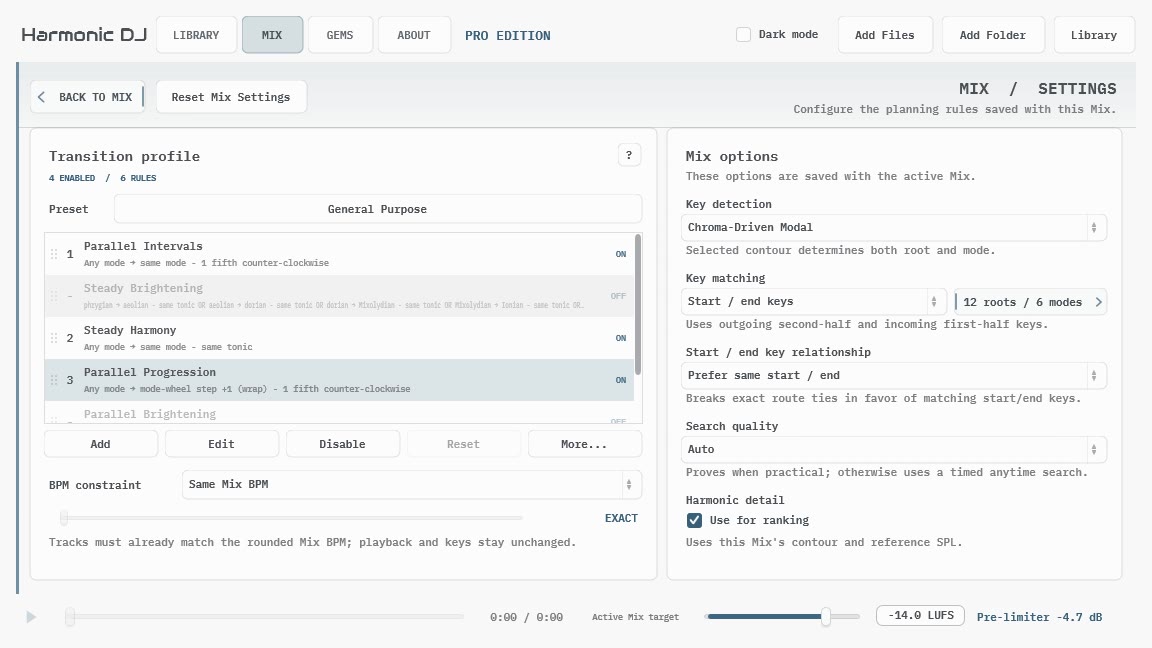
Harmonic DJ Mix Settings with transition profile and key matching controls
Transition profiles describe which directed key relationships a Mix accepts. The General Purpose profile is the release default, while focused profiles make one idea easy to hear in isolation.

Modal detection

Detected keys can distinguish Ionian, Dorian, Phrygian, Lydian, Mixolydian, and Aeolian instead of collapsing every track into major or minor.

Start and end evidence

Use separate incoming and outgoing evidence, or recombine both halves when one whole-track key better suits the Mix.

Transition profiles

Start with the factory relationships, focus on one directed rule, or build and save a reusable profile that reflects what you hear.

Selectable contours

Compare calibrated-flat, ECMA-418, and both supported ISO 226 profiles immediately without rescanning the Library.

The detailed model remains available when you want it. The release defaults are deliberately broad enough to generate a useful first preview before you touch any of these controls.

Back to top

Local Audio Stays Local

Harmonic DJ is local-first. It analyzes and auditions your audio on your computer, stores its Library as local user state, and does not upload commercial tracks for detection or license checks.

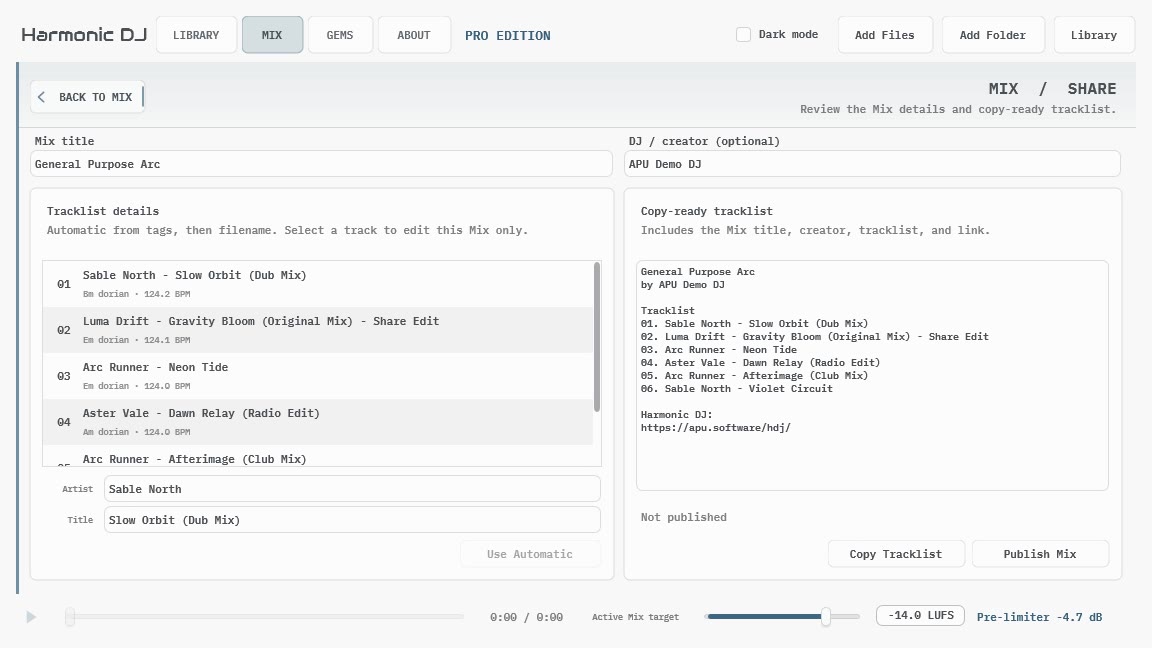
Harmonic DJ Share Mix page with synthetic editable tracklist details
Review the public tracklist, correct Mix-specific display names, copy it immediately, or publish and explicitly update a permanent Mix link.

Community can copy or publish its temporary Tracklist Preview. Pro can share complete saved Mixes.

A published Mix page contains the visible tracklist, keys, BPM, and transition strategy, not the audio, local paths, raw analysis, or private Mix history. First use sends a review link by email and still requires an explicit Publish and view Mix confirmation; later Mixes can reuse that verified publishing credential. Local edits never silently change a public page: Update Mix explicitly replaces the contents at the same permanent URL, and the page remains online until explicitly unpublished.

Portable collection files are designed for another Harmonic DJ user. They contain path-free identity, groups, BPM, key evidence, and loudness analysis, not your local paths, personal ratings, or audio. A separate Library metadata export retains paths and ratings when backing up your own analysis is the purpose.

Mix documents and transition presets likewise contain planning state rather than commercial audio. Remote collection tracks remain visibly metadata-only until legally obtained audio is added through the normal local Library workflow.

Back to top

Community and Pro

One application contains both editions. Community is free forever and does not require an account. A Pro trial or paid license unlocks larger saved Mixes, Gem Finder, and reusable Gems without replacing your Library.

Free forever

Community

A complete analyzer, Library, and editable Tracklist Preview of up to five tracks, not a detector-quality demo.

  • Unlimited local analysis and audition
  • Library search, filters, groups, personal ratings, and maintenance
  • Portable friend-to-friend collections
  • Complete key-profile and Mix Settings surface
  • Temporary preview of up to five tracks with locks, alternatives, exclusions, and regeneration
  • Copy or publish the Tracklist Preview
  • Import and export Mix files, and manage transition presets
  • Open and audition existing Pro Mixes and Gems, and drag their playable tracks to other applications

Introductory price · $70.00 one-time · Regular price $80.00

Pro

Everything in Community, plus larger saved Mixes and the complete Gem Finder workflow.

  • Create, rename, and duplicate auto-saved Mix documents
  • Exact track counts above five, arbitrary placement, and persistent undo/redo
  • Gem Finder and Find Next Gem
  • Save, rank, browse, and reuse directed Gems

Try Pro without a payment card. If the trial ends or a license becomes inactive, Harmonic DJ returns to Community while the Library, Mixes, Gems, collections, and presets remain stored.

Introductory price for a limited time: $70.00 one-time · Regular price $80.00

Download Community

Initial format: standalone application for macOS (Intel and Apple silicon), Windows (x86 and x64), and Linux (x64). Windows N and KN editions require the Microsoft Media Feature Pack. The initial public package does not include plug-in formats.

Back to top

Credits

This software was developed by APU Software, LLC and is available as a standalone application for Windows (x64 and x86), macOS (universal), and Linux (x64). The software libraries below are utilized for portions of the software:

  • JUCE (cross-platform audio and user interface framework)
  • Boost (header-only algorithms)
  • r8brain (sample rate conversion)
  • PFFFT (FFT library)
  • TagLib (audio metadata)
  • utf8cpp (Unicode support used by TagLib)

TagLib’s corresponding source is available in the APUSoftware/taglib repository.

Back to top